
The Ultimate Sprite Pipeline for Game Devs.
Stop manually aligning frames in Photoshop or GIMP. SpriteFix normalizes your messy sprite sheets — and packs multiple individual frames into engine-ready sheets — in seconds.
Free to try (with watermark). No credit card required.
Efficiency
10x Faster
Than manual sprite alignment in Photoshop or GIMP.
Ready to stop wasting time aligning sprites?
Start Fixing for FreeAny Input. Perfect Output.*
SpriteFix supports every common and uncommon layout. Stop worrying about formatting before you upload.
Supported Input Types

Delivered Output Types

* Extremely dense sheets where the same attack or VFX cycle repeats many times back-to-back with very little gap between repetitions may have a few repetitions merged into one frame today. Full per-cycle separation for these ultra-dense sequences is on our roadmap.
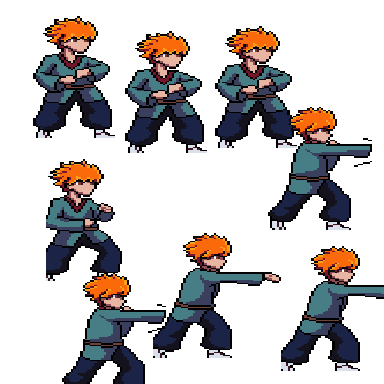
The Classic Fix: Normalize Messy Sprites
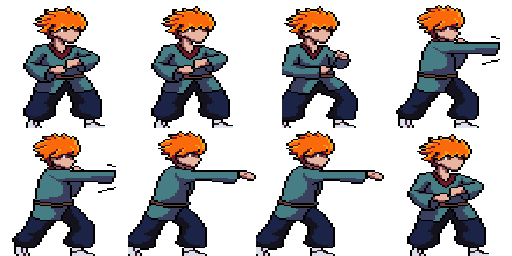
A real messy combat sprite — disconnected VFX, artifact columns, uneven frame spacing — fully normalized to a clean, engine-ready sheet.

Smart Batch Processing
Have a folder full of individual frame images or multiple messy sprite sheets? Drag and drop everything into SpriteFix. Our Smart Analyzer instantly detects what you uploaded, sequences frames into a single sheet, or fixes multiple sheets simultaneously. No Photoshop required.
- Supports up to 100 files at once (Max 4.5MB total) PRO
- Maintains frame order intelligently
Single Row Strip
4x2 Grid Output
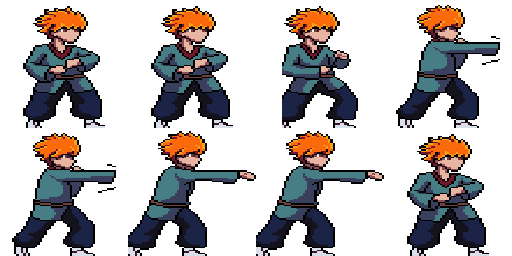
Full Layout Engine Control PRO
Different game engines have different requirements. Our pipeline separates the extraction phase from the composition phase, meaning you can convert absolutely any format into any other format seamlessly:
- Grid to Horizontal StripPerfect for converting 2D RPG Maker grids into 1D animation strips for Unity.
- Strip or Grid to ZIPSlice any complex sheet and download a .zip containing every single frame as an individual PNG.
- Massive Strip to Compact GridPack a 64-frame horizontal animation into an 8x8 square texture atlas for Unreal Engine.
Everything you need to ship faster.
Stop fighting with basic image editors. SpriteFix provides a complete, mathematically precise toolkit designed specifically for game asset pipelines.
Auto-Island Detection
Automatically detects the true bounds of your sprite and snaps it perfectly to the bottom-center anchor point, eliminating foot sliding.
Smart Batch ProcessingPRO
Drag and drop up to 100 individual frames or messy sheets at once (4.5MB total max size). We'll instantly detect the type and export perfectly clean sheets.
Format ConversionsPRO
Seamlessly convert dense grids into horizontal animation strips, or slice massive sheets into individual PNG frames via ZIP extraction.
Standardized Sizing
Snap your output directly to strict Power-of-Two dimensions (64x64, 128x128, 256x256) for optimal game engine texture packing.
Custom Frame Counts
Explicitly define how many frames are in your animation (e.g., 4, 8, or 16 frames) to guarantee mathematically perfect grid alignments and avoid off-by-one pixel shifts during playback.
"Treadmill" Previewing
Validate your generated sheet with our live in-browser previewer. It plays the animation perfectly locked in place to check for foot sliding.
Simple, lifetime pricing.
No recurring subscriptions. Pay once, own the power forever. Game dev is hard enough without another monthly bill.
FREE TRIAL
Perfect for testing the waters and seeing the magic.
- Normalize Sprite Sheets
- Row Layout
- Animated Live Previews
- Zero Watermarks
- Auto Island Detection
- 10-File Batching (2.5MB)
- Strict Grid Slicing
- ZIP Frame Exports
- Universal Layout Conversion Engine
BASIC PLAN
Clean, unwatermarked exports for simple workflows.
- Normalize Sprite Sheets
- Row Layout
- Animated Live Previews
- Zero Watermarks
- Auto Island Detection
- 10-File Batching (2.5MB)
- Strict Grid Slicing
- ZIP Frame Exports
- Universal Layout Conversion Engine
PRO PLAN
The ultimate pipeline tool for serious game developers.
- Normalize Sprite Sheets
- Grid & Row Layouts
- Animated Live Previews
- Zero Watermarks
- Auto Island Detection
- 100-File Batching (4.5MB)
- Strict Grid Slicing Module
- ZIP Frame Exports
- Universal Layout Conversion Engine
* BASIC TO PRO PLAN CONVERSION AVAILABLE FOR JUST THE PRICE DIFFERENCE OF $10
Prices are shown in USD and will be automatically converted to your local currency during checkout.
Frequently Asked Questions
Quick answers to common questions. Click any question to expand.
What does SpriteFix do?
SpriteFix automatically standardizes messy sprite sheets by aligning frames (bottom-center), normalizing dimensions, and repacking them into clean grids or rows ready for game engines.
What file formats and sizes are supported?
SpriteFix currently accepts PNG files with RGBA channels, up to 4096x4096px each. Free and Basic plans allow up to 10 files / 2.5MB total per batch; Pro allows up to 100 files / 4.5MB total.
Is SpriteFix free to use?
Yes — Free exports are watermarked. A one-time Basic upgrade removes the watermark for unlimited clean downloads, for life. A Pro upgrade adds 100-file batching, Grid output, Strict Grid Slicing, and ZIP frame exports. See the pricing section above for current prices.
Which game engines are compatible with SpriteFix exports?
SpriteFix exports standard sprite sheets (and ZIPs of individual frames on Pro) that work with all major game engines, including Unity, Godot, Unreal Engine, GameMaker, and Cocos2d-x.
Does SpriteFix separate every frame perfectly, even in dense combat animations?
For the vast majority of sprite sheets — including messy combat strips with detached VFX — yes. One known limitation: in extremely dense sheets where the same attack or effect repeats many times back-to-back with very little gap, a few of those repetitions can be merged into a single frame. Full per-cycle separation for these ultra-dense sequences is on our roadmap.
Can I change my settings after processing and try again?
Yes. On the Preview screen, click "← Adjust Settings & Reprocess"below the download buttons to return to the Configure panel with your files and settings preserved. Change anything and click "Process Fixed Sprite" again — repeat as many times as you need.